Asbab documentation
Thank you for purchasing Asbab — a multipurpose WordPress block theme with first-class Arabic (RTL) and English (LTR) support. This guide takes you from installation to a finished website.
توثيق قالب أسباب
شكراً لشرائك قالب أسباب — قالب ووردبريس متعدد الاستخدامات مبني بالبلوكات، بدعم أصيل للعربية والإنجليزية. هذا الدليل يأخذك من التثبيت حتى موقع جاهز.
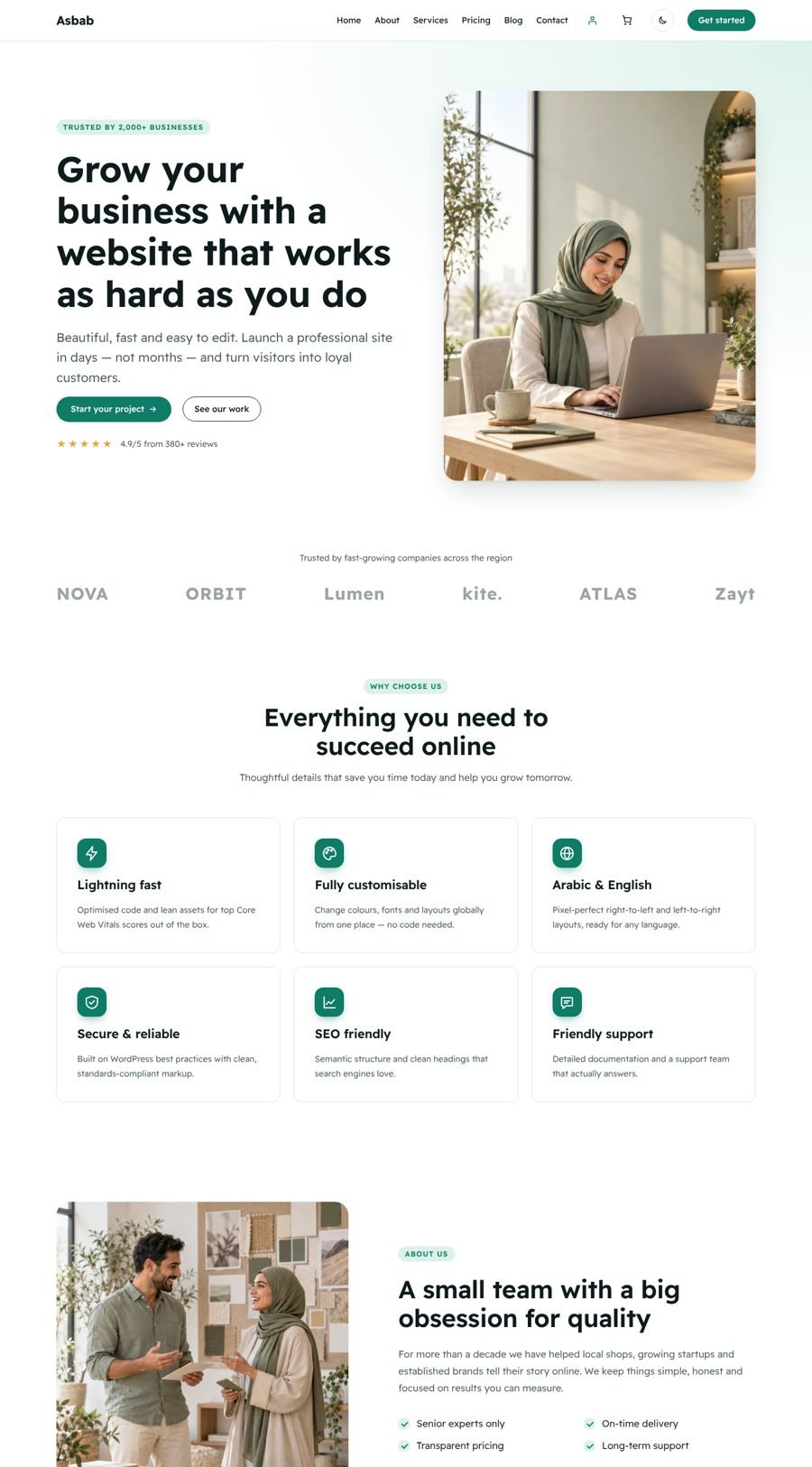
Requirementsالمتطلبات
- WordPress 6.6 or newer (tested up to 7.1)
- PHP 7.4 or newer
- Optional: WooCommerce 9+ for online-store features
- ووردبريس 6.6 أو أحدث (مُختبر حتى 7.1)
- PHP 7.4 أو أحدث
- اختياري: ووكومرس 9 أو أحدث لمزايا المتجر
Installationالتثبيت
- Unzip the package you downloaded. Inside you will find
asbab.zip(the installable theme) and this documentation. - In WordPress go to Appearance → Themes → Add New Theme → Upload Theme.
- Choose
asbab.zip, click Install Now, then Activate.
- فك ضغط الحزمة التي حمّلتها. ستجد بداخلها
asbab.zip(ملف القالب القابل للتثبيت) وهذا التوثيق. - من لوحة ووردبريس اذهب إلى المظهر ← قوالب ← أضف قالباً جديداً ← رفع قالب.
- اختر
asbab.zipواضغط التنصيب الآن ثم تفعيل.
Do not upload the whole package zip — upload asbab.zip only, otherwise WordPress reports “The package could not be installed. The theme is missing the style.css stylesheet.”
لا ترفع ملف الحزمة كاملاً — ارفع asbab.zip فقط، وإلا سيظهر خطأ "القالب لا يحتوي على ملف style.css".
Quick start: demo pages in one clickالبداية السريعة: صفحات تجريبية بضغطة واحدة
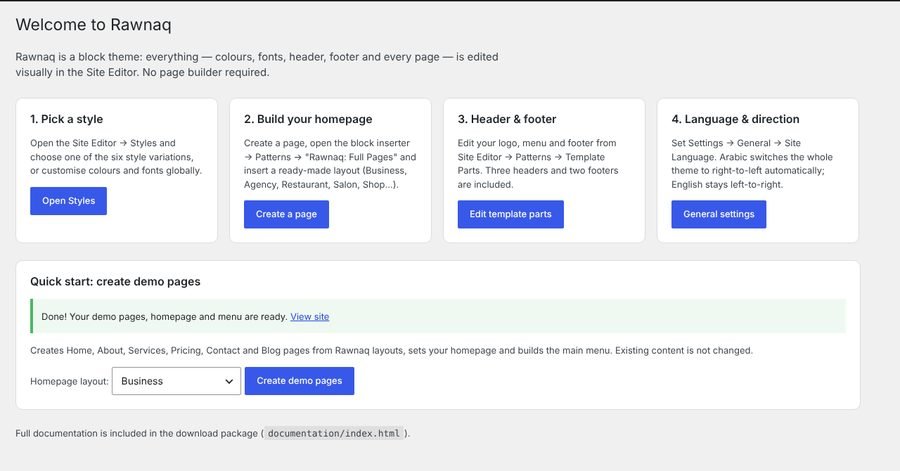
Go to Appearance → Asbab Guide, choose a homepage layout (Business, Agency, Restaurant/Café, Salon, Medical clinic, Real estate, Courses/Academy, Online Store, SaaS or Single-product sales page) and click Create demo pages. Asbab creates Home, About, Services, Pricing, Contact and Blog pages, sets the homepage and blog page, and builds the main menu. Nothing existing is changed or deleted.
اذهب إلى المظهر ← دليل أسباب، اختر تصميم الصفحة الرئيسية (شركة، وكالة، مطعم/مقهى، صالون، عيادة طبية، عقارات، دورات/أكاديمية، متجر إلكتروني، تطبيق أو صفحة بيع لمنتج واحد) ثم اضغط إنشاء الصفحات التجريبية. سينشئ أسباب صفحات الرئيسية، من نحن، الخدمات، الأسعار، تواصل معنا والمدونة، ويضبط الصفحة الرئيسية وصفحة المقالات، ويبني القائمة الرئيسية. لن يُحذف أو يتغير أي محتوى موجود.
Building pages manuallyبناء الصفحات يدوياً
- Pages → Add New. When the pattern picker opens, choose a layout from Asbab: Full Pages (or close it and use the + inserter → Patterns).
- In the sidebar, set the template to Page (No Title) for landing-style pages.
- Edit any text or image directly. Add more sections from the Asbab pattern categories.
- صفحات ← أضف جديدة. عند ظهور نافذة الأنماط اختر تصميماً من أسباب: صفحات كاملة (أو أغلقها واستخدم زر + ← الأنماط).
- من الشريط الجانبي اختر القالب صفحة (بدون عنوان) للصفحات التسويقية.
- عدّل أي نص أو صورة مباشرة، وأضف أقساماً أخرى من تصنيفات أنماط أسباب.
Style variationsأنماط الألوان
Open Appearance → Editor → Styles and click a variation. Every colour, gradient and font in every pattern updates instantly. You can also fine-tune colours, typography and spacing from the same panel.
افتح المظهر ← المحرر ← الأنماط واضغط على أي نمط. ستتغير ألوان وخطوط كل الأقسام فوراً. يمكنك أيضاً تعديل الألوان والخطوط والمسافات من نفس اللوحة.
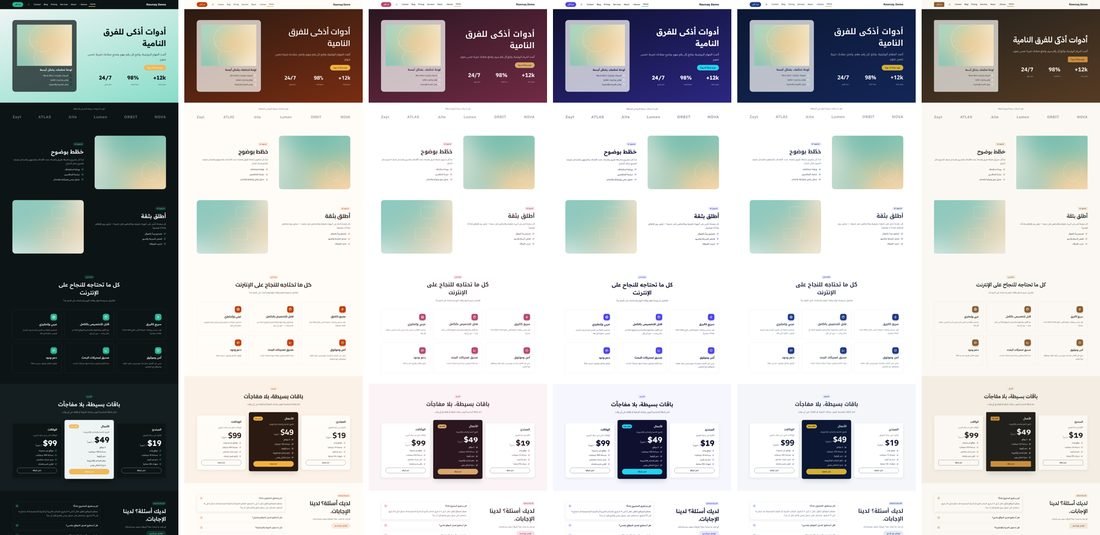
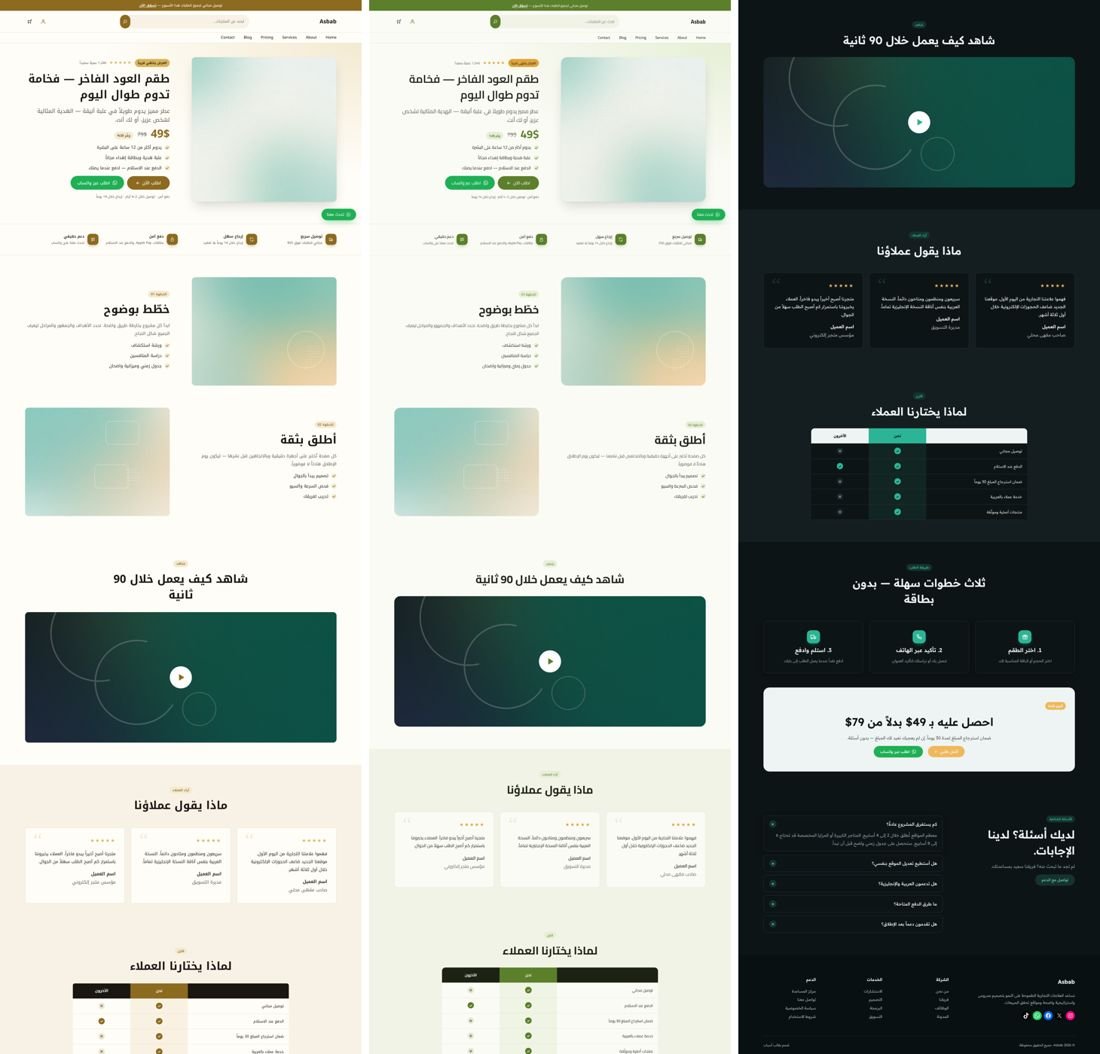
| Style | Best for | مناسب لـ | Font |
|---|---|---|---|
| Default (Emerald) | Business, services | الشركات والخدمات | Readex Pro |
| Midnight | Dark mode, tech, gaming | الوضع الداكن، التقنية | Readex Pro |
| Coral Café | Restaurants, cafés, bakeries | المطاعم والمقاهي | Cairo |
| Rose Salon | Salons, beauty, clinics | الصالونات والتجميل والعيادات | IBM Plex + Noto Kufi |
| Indigo Tech | SaaS, apps, startups | التطبيقات والشركات الناشئة | Readex Pro |
| Royal Navy | Corporate, law, finance | الشركات والمحاماة والمالية | Noto Kufi Arabic |
| Sand Editorial | Blogs, magazines, portfolios | المدونات والمجلات | IBM Plex Sans Arabic |
| Oud Gold | Perfume, jewellery, luxury gifts | العطور والمجوهرات والهدايا الفاخرة | Noto Kufi Arabic |
| Olive Organic | Organic food, honey, natural products | المنتجات العضوية والعسل والمنتجات الطبيعية | Cairo |
Patternsالأنماط الجاهزة (Patterns)
All patterns live in the block inserter under categories prefixed Asbab:.
كل الأنماط موجودة في أداة الإدراج تحت تصنيفات تبدأ بـ أسباب:
| Category | Patterns |
|---|---|
| Hero | Split with image · Centered · Full-screen cover · Stats & card · Restaurant · Salon |
| Features & Services | Icon grid · Image cards · Alternating rows · 4-step process · Services price list · Shop benefits |
| About & Team | About split · Stats band · Team grid |
| Pricing | Three plans · Restaurant menu · Services price list |
| Testimonials & Logos | Three cards · Large quote · Logo strip |
| Call to Action | Accent banner · Dark split · Newsletter · Shop promo |
| Content & FAQ | FAQ accordion · Portfolio gallery · Menu |
| Blog & Posts | Latest posts grid · Horizontal list |
| Contact | Contact details & cards |
| Shop | Category tiles · Latest products (WooCommerce) · Promo banners · Benefits bar |
| Real Estate | Hero · Property listings |
| Courses & Education | Hero · Course cards |
| Clinic & Medical | Hero · Departments · Doctors |
| Forms | Contact form · Booking / appointment form · Order form (cash on delivery) |
| Full Pages | Home — Business / Agency / Restaurant / Salon / Medical Clinic / Real Estate / Courses / Online Store / SaaS · Product landing (sales page) · Coming soon · About · Services · Pricing · Contact |
| New | Product hero with offer · How to order + final offer · Comparison table · Timeline · Opening hours & location · Video section · Announcement bar · Floating WhatsApp button · Author box |
Templates & template partsالقوالب وأجزاؤها
Templates: Index, Blog home, Single post, Single with sidebar, Page, Page (wide), Page (no title), Landing page (transparent header), Blank canvas, Archive, Search, 404. WooCommerce templates use the theme header and footer automatically.
القوالب: الفهرس، صفحة المدونة، المقال، المقال مع شريط جانبي، الصفحة، صفحة عريضة، صفحة بدون عنوان، صفحة هبوط بترويسة شفافة، صفحة فارغة، الأرشيف، البحث، 404. قوالب ووكومرس تستخدم ترويسة وتذييل القالب تلقائياً.
Parts: Header (store — search, account & cart, with announcement bar), Header (default, sticky), Header (centered with top bar), Header (transparent), Footer (four columns), Footer (minimal), Sidebar, Post meta. To switch header on all pages: Editor → Templates → choose a template → select the header block → in the toolbar use Replace.
الأجزاء: ترويسة المتجر (بحث وحساب وسلة مع شريط إعلان)، ترويسة افتراضية ثابتة، ترويسة متوسطة مع شريط علوي، ترويسة شفافة، تذييل بأربعة أعمدة، تذييل مبسّط، شريط جانبي، بيانات المقال. لتغيير الترويسة: المحرر ← القوالب ← اختر القالب ← حدد الترويسة ← من شريط الأدوات اختر استبدال.
Arabic, RTL & translationالعربية والاتجاه والترجمة
Set Settings → General → Site Language to العربية. The whole theme switches to right-to-left: layout, arrows, lists, quotes, pagination and menus. Asbab uses CSS logical properties everywhere, so there is no separate RTL stylesheet to maintain. All theme strings (including pattern texts) are translated to Arabic in languages/ar.po.
اختر الإعدادات ← عام ← لغة الموقع = العربية. سيتحول القالب كاملاً للاتجاه من اليمين لليسار: التخطيط والأسهم والقوائم والاقتباسات والترقيم. يعتمد أسباب على خصائص CSS المنطقية فلا يوجد ملف RTL منفصل. كل نصوص القالب (ومنها نصوص الأنماط) مترجمة للعربية في languages/ar.po.
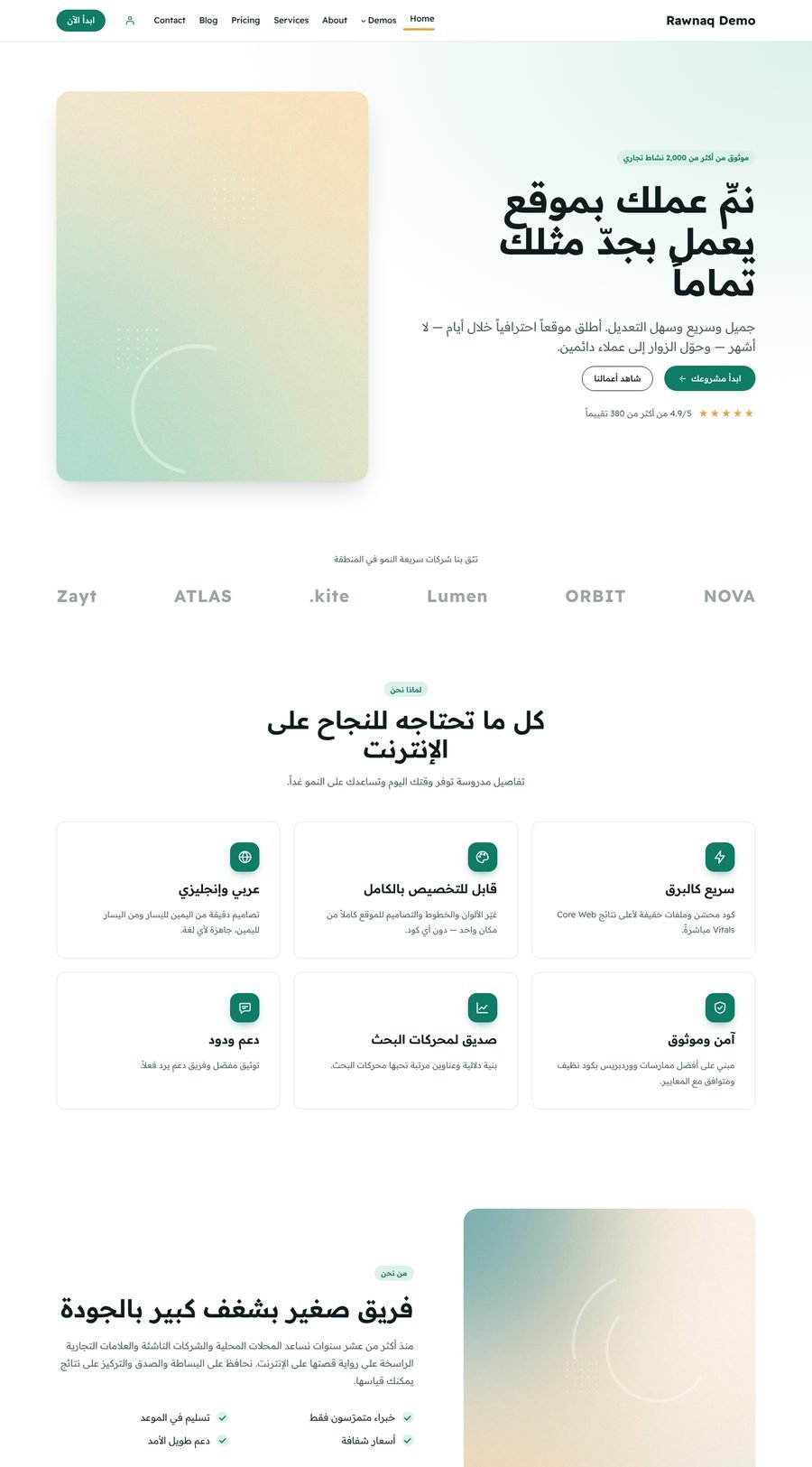
Other languages: translate languages/asbab.pot with Poedit or Loco Translate. Bilingual sites: Asbab works with Polylang, WPML and TranslatePress.
لغات أخرى: ترجم ملف languages/asbab.pot باستخدام Poedit أو إضافة Loco Translate. مواقع ثنائية اللغة: أسباب متوافق مع Polylang و WPML و TranslatePress.
Pattern texts are translated when the pattern is inserted. Pages created before switching language keep their original text — edit them or recreate from patterns.
نصوص الأنماط تُترجم لحظة إدراجها. الصفحات التي أُنشئت قبل تغيير اللغة تبقى بنصها الأصلي — عدّلها أو أعد إنشاءها من الأنماط.
WooCommerce
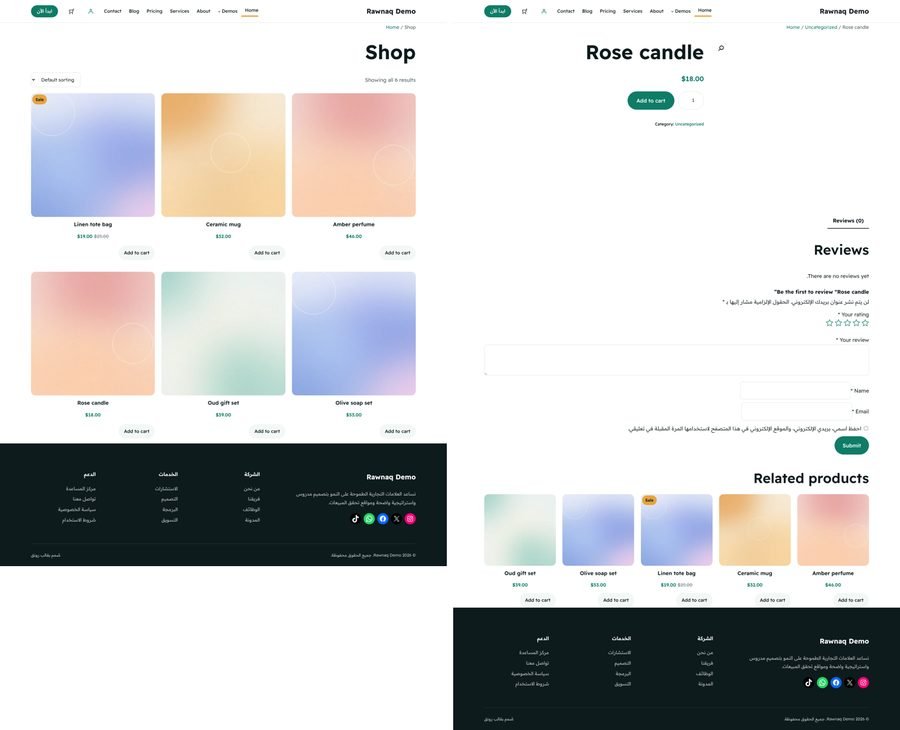
Install and activate WooCommerce. Asbab styles the block-based shop, product pages, mini cart, cart and checkout to match your chosen style variation. The Shop — latest products pattern automatically uses the WooCommerce Product Collection block; the mini cart appears in the default header.
ثبّت وفعّل ووكومرس. ينسّق أسباب صفحات المتجر والمنتج والسلة المصغرة والسلة والدفع لتتناسق مع نمط الألوان المختار. نمط المتجر — أحدث المنتجات يستخدم بلوك مجموعة المنتجات تلقائياً، وأيقونة السلة تظهر في الترويسة.
Visitor dark modeالوضع الداكن للزوار
A moon/sun switch appears automatically in every header. Visitors’ choice is remembered on their device, and there is no colour flash on page load. It works with every style variation because only the neutral colours change — your accent colours stay the same. Configure it in Appearance → Asbab Guide → Visitor dark mode: show the switch (light by default), follow each visitor’s device setting, or turn it off. To hide the switch in one header only, add the CSS class asbab-no-dark-toggle to that header group.
يظهر زر القمر/الشمس تلقائياً في كل الترويسات، ويُحفظ اختيار الزائر على جهازه دون أي وميض عند تحميل الصفحة. يعمل مع كل أنماط الألوان لأنه يغيّر الألوان المحايدة فقط وتبقى ألوانك المميزة كما هي. اضبطه من المظهر ← دليل أسباب ← الوضع الداكن للزوار: إظهار الزر (يبدأ فاتحاً)، أو اتباع إعداد جهاز الزائر، أو الإيقاف. لإخفاء الزر من ترويسة معيّنة أضف الفئة asbab-no-dark-toggle لمجموعة تلك الترويسة.
Forms: contact, booking & cash-on-delivery ordersالنماذج: تواصل وحجز وطلب بالدفع عند الاستلام
| Edition | النسخة | How forms are provided | طريقة توفير النماذج |
|---|---|---|---|
| ThemeForest | Install the companion plugin Asbab Toolkit (forms + Mega Menu block + AI abilities) from the /plugins folder of your download (Plugins → Add New → Upload). The theme shows a reminder until it is installed. | ثبّت الإضافة المرافقة Asbab Toolkit (النماذج + بلوك القائمة الضخمة + قدرات الذكاء الاصطناعي) من مجلد /plugins في حزمة التحميل (الإضافات ← أضف جديد ← رفع). يظهر تنبيه في لوحة التحكم حتى تثبيتها. | |
| Asbab (direct) | أسباب (مباشر) | Built into the theme — nothing to install. | مدمجة داخل القالب — لا حاجة لتثبيت شيء. |
- Insert the Asbab Form block, or a ready-made pattern from Asbab: Forms. In the block sidebar choose the form type (Contact, Booking, Order), the services or product options (one per line), button text and success message.
- Every submission is saved in Form entries (admin menu) and emailed to the address in Settings → Asbab Toolkit. Each entry has a “Reply on WhatsApp” button.
- WhatsApp hand-off: turn on “Open WhatsApp with the details after sending” to send the customer to your WhatsApp with the order details pre-filled — perfect for cash-on-delivery stores.
- Spam protection is built in (honeypot, minimum fill time, rate limiting). For SMTP delivery use any SMTP plugin.
- أدرج بلوك نموذج أسباب أو نمطاً جاهزاً من تصنيف أسباب: النماذج. من الشريط الجانبي اختر نوع النموذج (تواصل، حجز، طلب)، والخدمات أو خيارات المنتج (خيار في كل سطر)، ونص الزر ورسالة النجاح.
- تُحفظ كل رسالة في رسائل النماذج (قائمة لوحة التحكم) وتُرسل إلى البريد المحدد في الإعدادات ← أدوات أسباب، ولكل رسالة زر "الرد عبر واتساب".
- المتابعة عبر واتساب: فعّل "فتح واتساب مع البيانات بعد الإرسال" لينتقل العميل إلى واتساب متجرك مع تفاصيل الطلب جاهزة — مثالي لمتاجر الدفع عند الاستلام.
- الحماية من السبام مدمجة (حقل مخفي، حد أدنى لوقت التعبئة، تحديد عدد المحاولات). لضمان وصول البريد استخدم أي إضافة SMTP.
Mega menuالقائمة الضخمة (Mega Menu)
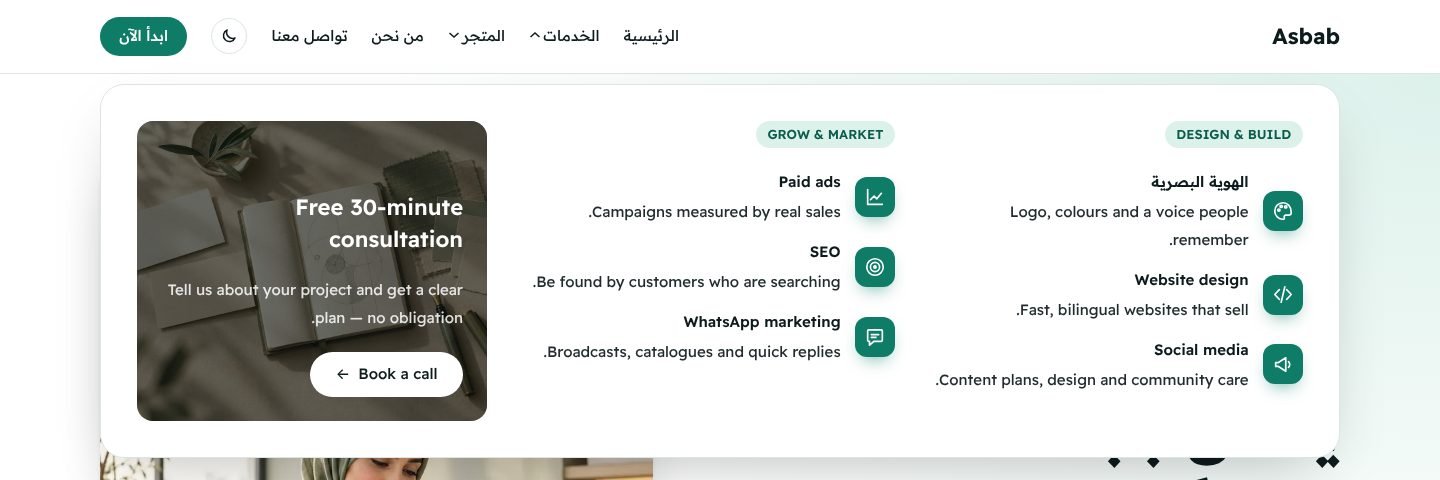
Asbab supports two kinds of mega menu:
يدعم أسباب نوعين من القوائم الضخمة:
- Mega Menu block (Asbab Toolkit plugin / built into the direct edition) — a rich panel with columns, icons, images and buttons. In Appearance → Editor, select the header’s Navigation block, click + and add Mega Menu. In the block sidebar type the label and choose a Panel. Two panels are included: Mega menu: Services and Mega menu: Store. Edit them (or create new ones) in Appearance → Editor → Patterns → Mega menu, or click Edit panel in the block sidebar. Choose the width: header width, full screen or compact.
- “Mega menu (columns)” style — works with no plugin. Add a Submenu item, put further submenus inside it (each becomes a titled column) and links inside those, then choose the style Mega menu (columns) in the sidebar.
- بلوك القائمة الضخمة (من إضافة Asbab Toolkit / مدمج في النسخة المباشرة) — لوحة غنية بأعمدة وأيقونات وصور وأزرار. من المظهر ← المحرر حدّد بلوك التنقل في الترويسة، اضغط + وأضف قائمة ضخمة، ثم اكتب العنوان واختر اللوحة من الشريط الجانبي. تأتي لوحتان جاهزتان: قائمة ضخمة: الخدمات وقائمة ضخمة: المتجر. عدّلهما (أو أنشئ لوحات جديدة) من المظهر ← المحرر ← الأنماط ← القائمة الضخمة أو بزر تعديل اللوحة. واختر العرض: بعرض الترويسة، بعرض الشاشة، أو مضغوطة.
- نمط "قائمة ضخمة (أعمدة)" — يعمل دون أي إضافة. أضف عنصر قائمة فرعية، وضع بداخله قوائم فرعية أخرى (كل واحدة تصبح عموداً بعنوان) وبداخلها الروابط، ثم اختر النمط قائمة ضخمة (أعمدة) من الشريط الجانبي.
Both open on hover and click, are fully keyboard accessible (Esc closes), become an accordion inside the mobile menu, and support RTL and dark mode. Add the class asbab-mega-hide-mobile to any column you want to hide on phones.
كلاهما يفتح بالمرور أو النقر، ويدعم لوحة المفاتيح بالكامل (Esc للإغلاق)، ويتحول إلى قائمة قابلة للطي داخل قائمة الجوال، مع دعم الاتجاه من اليمين والوضع الداكن. أضف الفئة asbab-mega-hide-mobile لأي عمود تريد إخفاءه على الجوال.
Build & manage your site with Claude or ChatGPTابنِ موقعك وأدِره بواسطة Claude أو ChatGPT
Asbab registers 13 abilities with the WordPress Abilities API (WordPress 6.9+). Any AI assistant connected through MCP can discover and use them — always as a logged-in WordPress user and only within that user’s permissions. You can turn them off in Settings → Asbab Toolkit.
يسجّل أسباب 13 قدرة في واجهة القدرات (Abilities API) في ووردبريس 6.9 فأحدث. أي مساعد ذكاء اصطناعي متصل عبر MCP يستطيع اكتشافها واستخدامها — دائماً باسم مستخدم ووردبريس مسجّل وضمن صلاحياته فقط. يمكنك إيقافها من الإعدادات ← أدوات أسباب.
| Ability | What it does | ماذا تفعل |
|---|---|---|
asbab/get-site-overview | Pages, homepage, menu, style, settings | الصفحات، الرئيسية، القائمة، النمط، الإعدادات |
asbab/list-layouts | Lists the 70+ ready-made sections and full pages | عرض أكثر من 70 قسماً وصفحة جاهزة |
asbab/create-page | Builds a page from layouts; can set it as homepage and add it to the menu | إنشاء صفحة من التصاميم، وتعيينها رئيسية وإضافتها للقائمة |
asbab/get-page-content · asbab/update-page | Reads every text, replaces texts with your real content, adds sections, publishes | قراءة كل النصوص واستبدالها بمحتواك الحقيقي، إضافة أقسام، النشر |
asbab/get-design-options · asbab/set-style | Colour schemes, fonts and brand colours | أنماط الألوان والخطوط وألوان العلامة التجارية |
asbab/set-site-identity | Site name, tagline, logo, site icon | اسم الموقع والوصف والشعار والأيقونة |
asbab/update-menu | Header menu items, including mega menus | عناصر القائمة بما فيها القوائم الضخمة |
asbab/edit-template-part | Texts in header, footer and mega menu panels | نصوص الترويسة والتذييل ولوحات القائمة الضخمة |
asbab/set-contact-details | WhatsApp number (updates every WhatsApp button) and notification email | رقم واتساب (يحدّث كل أزرار واتساب) وبريد الإشعارات |
asbab/set-dark-mode | Dark mode switch / auto / off | الوضع الداكن: زر / تلقائي / إيقاف |
asbab/list-form-entries | Latest messages, bookings and orders | آخر الرسائل والحجوزات والطلبات |
Easiest way (1.0.3+): open Appearance → AI connection, choose your AI app and copy the one server URL into Claude (Settings → Connectors → Add custom connector) or ChatGPT. Your site opens in the browser — sign in and click “Allow”. No extra plugin, no password to copy. The manual steps below are only needed for tools without OAuth sign-in.
الطريقة الأسهل (من الإصدار 1.0.3): افتح المظهر ← ربط الذكاء الاصطناعي، اختر تطبيقك وانسخ رابط الخادم الواحد إلى Claude (الإعدادات ← الموصلات ← إضافة موصل مخصص) أو ChatGPT. ستفتح صفحة من موقعك — سجّل الدخول واضغط «السماح». بدون أي إضافة إضافية وبدون نسخ كلمات مرور. الخطوات اليدوية التالية مطلوبة فقط للأدوات التي لا تدعم تسجيل الدخول عبر OAuth.
1. Prepare WordPress1. جهّز ووردبريس
- Make sure you run WordPress 6.9 or newer and (ThemeForest edition) that Asbab Toolkit is active.
- Install and activate the free MCP Adapter plugin (Plugins → Add New → search “MCP Adapter”). Any other MCP plugin built on the Abilities API also works.
- Recommended: create a separate user for the AI (Administrator for full site building, Editor for content only), then Users → Profile → Application Passwords → name it “Claude” → Add and copy the password (shown once).
- تأكد أن ووردبريس 6.9 أو أحدث، وأن إضافة Asbab Toolkit مفعّلة (نسخة ThemeForest).
- ثبّت وفعّل إضافة MCP Adapter المجانية (الإضافات ← أضف جديد ← ابحث عن "MCP Adapter"). أي إضافة MCP أخرى مبنية على واجهة القدرات تعمل أيضاً.
- يُنصح بإنشاء مستخدم خاص بالذكاء الاصطناعي (مدير لبناء الموقع كاملاً، أو محرر للمحتوى فقط)، ثم المستخدمون ← الملف الشخصي ← كلمات مرور التطبيقات ← سمّها "Claude" ← إضافة وانسخ كلمة المرور (تظهر مرة واحدة).
2. Connect Claude (Claude Desktop)2. اربط Claude (تطبيق Claude Desktop)
Install Node.js. In Claude Desktop open Settings → Developer → Edit Config and add (replace the three values), then quit Claude completely and reopen it:
ثبّت Node.js. في Claude Desktop افتح الإعدادات ← Developer ← Edit Config وأضف ما يلي (مع استبدال القيم الثلاث)، ثم أغلق Claude تماماً وأعد فتحه:
{
  "mcpServers": {
    "my-asbab-site": {
      "command": "npx",
      "args": ["-y", "@automattic/mcp-wordpress-remote@latest"],
      "env": {
        "WP_API_URL": "https://YOUR-SITE.com/wp-json/mcp/mcp-adapter-default-server",
        "WP_API_USERNAME": "your-username",
        "WP_API_PASSWORD": "xxxx xxxx xxxx xxxx xxxx xxxx",
        "OAUTH_ENABLED": "false"
      }
    }
  }
}
Claude Code: claude mcp add my-asbab-site --env WP_API_URL=… --env WP_API_USERNAME=… --env WP_API_PASSWORD=… -- npx -y @automattic/mcp-wordpress-remote@latest
Claude Code: claude mcp add my-asbab-site --env WP_API_URL=… --env WP_API_USERNAME=… --env WP_API_PASSWORD=… -- npx -y @automattic/mcp-wordpress-remote@latest
3. Connect ChatGPT or claude.ai (web)3. اربط ChatGPT أو claude.ai (الويب)
Web connectors in ChatGPT (Developer mode → Create connector) and claude.ai (Settings → Connectors → Add custom connector) need a public HTTPS MCP URL with OAuth sign-in. Use an MCP plugin that offers OAuth and the Abilities API, paste the MCP URL it gives you, and sign in with your WordPress account. Menu names may differ slightly as these apps update.
موصلات الويب في ChatGPT (وضع المطوّر ← إنشاء موصل) وفي claude.ai (الإعدادات ← الموصلات ← إضافة موصل مخصص) تحتاج رابط MCP عاماً عبر HTTPS مع تسجيل دخول OAuth. استخدم إضافة MCP تدعم OAuth وواجهة القدرات، والصق رابط MCP الذي تعطيك إياه، ثم سجّل الدخول بحساب ووردبريس. قد تختلف أسماء القوائم قليلاً مع تحديثات هذه التطبيقات.
4. Example requests4. أمثلة على الطلبات
- “Build a homepage for my dental clinic ‘Al Noor’ in Riyadh using the clinic layout, replace all demo texts with real ones, and publish it as the homepage.”
- “Switch the site to the Oud Gold style, use the Cairo font and set the brand colour to #8A5A2B.”
- “Set my WhatsApp number to 966500000000 and add Services and Store mega menus to the header.”
- “Show me today’s cash-on-delivery orders.”
- «ابنِ صفحة رئيسية لعيادة أسنان "النور" في الرياض بتصميم العيادات، واستبدل كل النصوص التجريبية بنصوص حقيقية، وانشرها كصفحة رئيسية.»
- «حوّل الموقع إلى نمط الذهبي — عود، واستخدم خط Cairo، واجعل لون العلامة #8A5A2B.»
- «ضع رقم واتساب 966500000000، وأضف قائمتين ضخمتين للخدمات والمتجر في الترويسة.»
- «اعرض لي طلبات الدفع عند الاستلام لهذا اليوم.»
Safety: new pages are drafts unless you ask to publish; texts are replaced without breaking the design; every action is limited to the connected user’s role. Revoke access any time by deleting the application password.
الأمان: الصفحات الجديدة تُحفظ كمسودات ما لم تطلب نشرها؛ النصوص تُستبدل دون إفساد التصميم؛ وكل إجراء محدود بصلاحيات المستخدم المتصل. يمكنك إلغاء الوصول في أي وقت بحذف كلمة مرور التطبيق.
Sales page & WhatsApp orderingصفحة البيع والطلب عبر واتساب
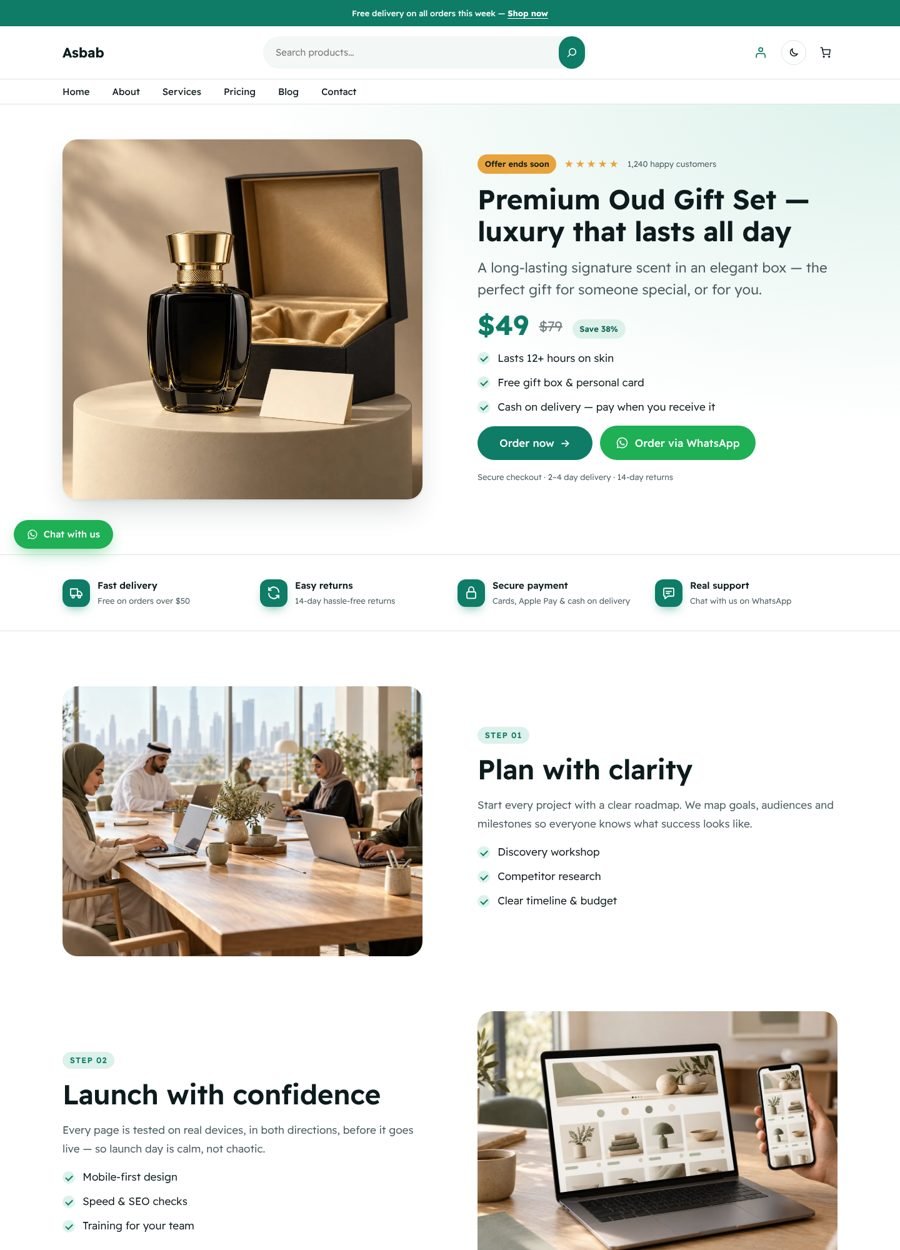
The Product landing page layout is built for single-product stores and cash-on-delivery offers: product hero with price/discount, benefits, video, reviews, comparison table, “how to order” steps, final offer and FAQ. Use it with the Page (Store header) template, or choose Single product landing page in the one-click demo importer.
تصميم صفحة هبوط المنتج مخصص لمتاجر المنتج الواحد وعروض الدفع عند الاستلام: واجهة المنتج مع السعر والخصم، المزايا، فيديو، آراء العملاء، جدول مقارنة، خطوات الطلب، العرض النهائي والأسئلة الشائعة. استخدمه مع قالب صفحة (ترويسة المتجر)، أو اختر صفحة هبوط لمنتج واحد من أداة إنشاء الصفحات التجريبية.
- WhatsApp buttons: any button can use the WhatsApp style. Set the link to
https://wa.me/9665XXXXXXXX(country code, no + or zeros). Add?text=for a pre-filled message. - Floating WhatsApp button: insert the “Floating WhatsApp button” pattern once inside the Footer template part — it then appears on every page (icon-only on phones).
- Order buttons: link “Order now” to your WooCommerce product, checkout (
/?add-to-cart=ID) or a form.
- أزرار واتساب: أي زر يمكن أن يأخذ نمط واتساب. اجعل الرابط
https://wa.me/9665XXXXXXXX(رمز الدولة بدون + أو أصفار)، ويمكن إضافة?text=لرسالة جاهزة. - زر واتساب العائم: أدرج نمط "زر واتساب عائم" مرة واحدة داخل جزء التذييل، وسيظهر في كل الصفحات (أيقونة فقط على الجوال).
- أزرار الطلب: اربط زر "اطلب الآن" بمنتج ووكومرس أو صفحة الدفع (
/?add-to-cart=ID) أو بنموذج طلب.
Block styles & helper classesأنماط البلوكات وفئات CSS المساعدة
Select a block and open the Styles tab in the sidebar:
حدد أي بلوك وافتح تبويب الأنماط في الشريط الجانبي:
| Block | Styles |
|---|---|
| Group / Column | Card · Outlined · Glass · Card (Hover lift) |
| Button | With arrow (flips in RTL) · Soft · Text link · WhatsApp · Play button |
| Table | Comparison |
| Heading / Paragraph | Eyebrow · Accent underline · Lead |
| List | Checkmarks · No bullets |
| Image | Shadow · Framed |
| Details | FAQ accordion |
| Quote | Testimonial |
| Columns / Separator / Post terms / Nav link | Divided · Short accent · Pills · Underline on hover |
Helper classes (Block → Advanced → Additional CSS class):
فئات مساعدة (البلوك ← متقدم ← فئة CSS إضافية):
| Class | Effect | التأثير |
|---|---|---|
asbab-reveal | Fade-up animation when scrolled into view | ظهور متحرك عند التمرير |
asbab-hide-mobile / asbab-show-mobile | Hide on / show only on phones | إخفاء على الجوال / إظهار على الجوال فقط |
asbab-muted | Softer, secondary text | نص ثانوي أخف |
asbab-badge | Small highlighted label | شارة صغيرة مميزة |
asbab-mirror-rtl | Mirror an image in Arabic (for arrows/illustrations) | عكس الصورة في العربية (للأسهم والرسومات) |
Replacing images & iconsاستبدال الصور والأيقونات
Demo images are original abstract artwork so the theme looks complete out of the box. Click any image → Replace to use your own photos. Icons are image blocks: click → Replace and upload any SVG or PNG; the coloured tile follows your accent colour.
الصور التجريبية رسومات تجريدية أصلية ليظهر القالب مكتملاً من البداية. اضغط على أي صورة ← استبدال لاستخدام صورك. الأيقونات عبارة عن بلوكات صور: اضغط ← استبدال وارفع أي SVG أو PNG، والخلفية الملونة تتبع لون موقعك.
Child theme & custom CSSقالب فرعي و CSS مخصص
Small tweaks: Editor → Styles → ⋮ → Additional CSS. For larger changes create a child theme:
للتعديلات البسيطة: المحرر ← الأنماط ← ⋮ ← CSS إضافي. للتعديلات الكبيرة أنشئ قالباً فرعياً:
/* wp-content/themes/asbab-child/style.css */
/*
Theme Name: Asbab Child
Template: asbab
*/
Copy any file from templates/, parts/ or patterns/ into the child theme to override it. Updates to Asbab will not overwrite your changes.
انسخ أي ملف من templates/ أو parts/ أو patterns/ إلى القالب الفرعي لتعديله. تحديثات أسباب لن تمسح تعديلاتك.
FAQأسئلة شائعة
Do I need Elementor or another page builder?
هل أحتاج Elementor أو منشئ صفحات آخر؟
No. Asbab is built for the native WordPress Site Editor — faster pages and no extra plugins.
لا. أسباب مبني لمحرر ووردبريس الأصلي — صفحات أسرع وبدون إضافات إضافية.
How do I add a contact form?
كيف أضيف نموذج تواصل؟
Install any form plugin (Contact Form 7, WPForms, Fluent Forms) and insert its block in the Contact section.
ثبّت أي إضافة نماذج (Contact Form 7 أو WPForms أو Fluent Forms) وأدرج بلوكها في قسم التواصل.
My changes in the Site Editor disappeared after switching style.
تعديلاتي اختفت بعد تغيير النمط.
Choosing a style variation replaces global colours/fonts only. Page content and template edits are never affected. Use Styles → Revisions to go back.
اختيار نمط ألوان يستبدل الألوان والخطوط العامة فقط، ولا يمس محتوى الصفحات أو تعديلات القوالب. يمكنك الرجوع من الأنماط ← المراجعات.
How do I reset a template?
كيف أعيد قالباً لحالته الأصلية؟
Editor → Templates → hover the template → ⋮ → Reset.
المحرر ← القوالب ← مرّر على القالب ← ⋮ ← إعادة تعيين.
Credits & licensesالحقوق والتراخيص
- Asbab theme code — GPLv2 or later. © 2026 Haytham Naser.
- Fonts — Readex Pro, Tajawal, Cairo, Noto Kufi Arabic, IBM Plex Sans Arabic — SIL Open Font License 1.1 (license files in
assets/fonts). - Images & icons — original works created for Asbab, GPLv2 or later.
Changelogسجل التغييرات
1.0.0 — Initial release: 70+ patterns, 15 page layouts, 8 style variations, dark mode, forms, Mega Menu, AI abilities for Claude & ChatGPT.الإصدار الأول: أكثر من 70 نمطاً، 15 تصميم صفحة، 8 أنماط ألوان، وضع داكن، نماذج، قائمة ضخمة، وقدرات ذكاء اصطناعي لـ Claude و ChatGPT.